WordPress SEO continues to be a hot topic. While it’s commonly communicated that search engines (ie. Google) love WordPress blogs, many are unfamiliar with the mechanics of making sure their pages and posts are consumable and “lovely” for the likes of Google. Please be aware that keyword research is necessary before you can even start performing SEO on your WordPress (or any) site as you must know up front what search phrases you’re optimizing for (more here and here)!
Many WordPress bloggers and business poeple who manage a WordPress-based site utilize the “All in one SEO Pack” or “Platinum SEO Pack” plugins. Once configured, these two plugins work very much the name in how you enter the optimization text for the page or post. This entry will show use a screen shot from “Platinum SEO Pack” and step you through the process of performing SEO on your WordPress blog posts and/or pages.
It’s a simple process, once you’ve done your keyword research. So settle in and enjoy the read!
Here is the WordPress SEO box provided by Platinum SEO Pack. You’ll find it below the text editing box (where you enter your blog entry or page content). The header of the box clearly says “Platinum SEO Pack” so you shouldn’t miss it. If it’s collapsed–only showing the header, simply click the down-arrow displayed in the right of the header when you place the mouse cursor over it. This will cause it to expand.
Platinum SEO Pack Screenshot
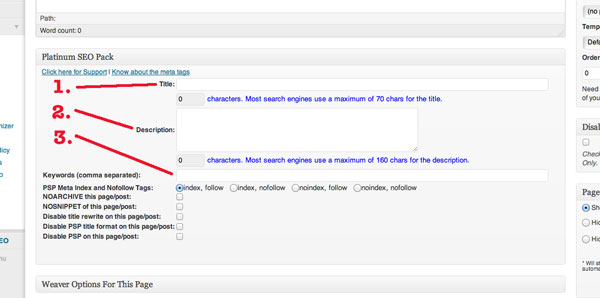
WordPress SEO Steps
- Title: This is the title for your page. If you leave this blank, WordPress will utilize the title you’ve entered as the title of the page or post. However, it is recommended that you provide a valid, keyword rich title of approximately 60-80 characters long (search engines won’t index more than 70 characters). Use your keyword research results and place keywords in your title, but don’t force it–make the title flow naturally. I’ve seen people use their keywords in titles like this: [keyword phrase here] – <rest of the title here that applies to what’s really on the page>. You don’t want to do that. Write about what’s relevant to your audience using your keywords. This title gets displayed on the search results page as the title of your entry. Make it compelling to your audience!
- Description: This is your opportunity to be more verbose and use more keywords by creating a keyword-rich description. Again it needs to flow naturally when reading it. This description is what the search engines will display under your title as the description of this page. Keyword stuffing is not appropriate and will get you in trouble. Instead, utilize 1-3 keyword phrases to build a meaningful paragraph of less-than 160 characters that accurately describes what the page is about. If you’re a local business, it’s appropriate to sometimes put “serving <city 1>, <city 2> and <city 3>.” But mix it up by not always including the same cities and order.
- Keywords (comma separated): You can safely ignore this field and leave it blank. Google is currently ignoring it.
By doing this WordPress SEO process on every page and blog post, the search engines will love you–especially when your title and description match your content! Good luck, I wish you the best.
And if you need help, we can do that. Use the button in the sidebar to call or use the contact form to drop me a line. Alternatively, email [email protected].
Follow Us!