Image
  • Home
  • Products
  • Blog
  • Resources
  • FAQ
  • Contact
  • About
    • Privacy Policy

Archive for Marketing

WordPress SEO Using The Platinum SEO Pack Plugin

By admin
Friday, August 3rd, 2012

WordPress SEO continues to be a hot topic.  While it’s commonly communicated that search engines (ie. Google) love WordPress blogs, many are unfamiliar with the mechanics of making sure their pages and posts are consumable and “lovely” for the likes of Google.  Please be aware that keyword research is necessary before you can even start performing SEO on your WordPress (or any) site as you must know up front what search phrases you’re optimizing for (more here and here)!

Many WordPress bloggers and business poeple who manage a WordPress-based site utilize the “All in one SEO Pack” or “Platinum SEO Pack” plugins.  Once configured, these two plugins work very much the name in how you enter the optimization text for the page or post.  This entry will show use a screen shot from “Platinum SEO Pack” and step you through the process of performing SEO on your WordPress blog posts and/or pages.

It’s a simple process, once you’ve done your keyword research.  So settle in and enjoy the read!

Here is the WordPress SEO box provided by Platinum SEO Pack.  You’ll find it below the text editing box (where you enter your blog entry or page content).  The header of the box clearly says “Platinum SEO Pack” so you shouldn’t miss it.  If it’s collapsed–only showing the header, simply click the down-arrow displayed in the right of the header when you place the mouse cursor over it.  This will cause it to expand.

Platinum SEO Pack Screenshot
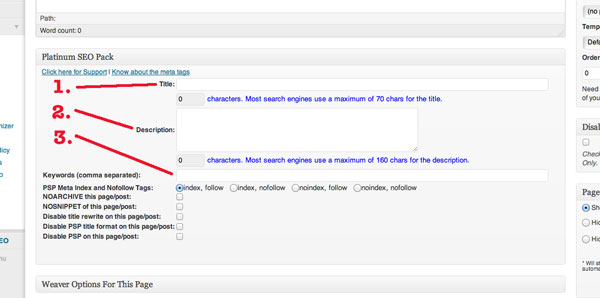
WordPress SEO Steps

  1. Title:  This is the title for your page.  If you leave this blank, WordPress will utilize the title you’ve entered as the title of the page or post.  However, it is recommended that you provide a valid, keyword rich title of approximately 60-80 characters long (search engines won’t index more than 70 characters).  Use your keyword research results and place keywords in your title, but don’t force it–make the title flow naturally.  I’ve seen people use their keywords in titles like this: [keyword phrase here] – <rest of the title here that applies to what’s really on the page>.  You don’t want to do that.  Write about what’s relevant to your audience using your keywords.  This title gets displayed on the search results page as the title of your entry.  Make it compelling to your audience!
  2. Description:  This is your opportunity to be more verbose and use more keywords by creating a keyword-rich description.  Again it needs to flow naturally when reading it.  This description is what the search engines will display under your title as the description of this page.  Keyword stuffing is not appropriate and will get you in trouble.  Instead, utilize 1-3 keyword phrases to build a meaningful paragraph of less-than 160 characters that accurately describes what the page is about.  If you’re a local business, it’s appropriate to sometimes put “serving <city 1>, <city 2> and <city 3>.”  But mix it up by not always including the same cities and order.
  3. Keywords (comma separated):  You can safely ignore this field and leave it blank.  Google is currently ignoring it.

By doing this WordPress SEO process on every page and blog post, the search engines will love you–especially when your title and description match your content!  Good luck, I wish you the best.

And if you need help, we can do that.  Use the button in the sidebar to call or use the contact form to drop me a line.  Alternatively, email [email protected].

Categories : SEO, Web Site, WordPress

How Do I Know If Blog Comments Are Spam?

By Todd
Sunday, October 23rd, 2011

If you’ve been blogging for a while now and the “Big G” (er… Google) is indexing your posts, then you’re probably seeing some comment activity on one or more of your blog posts.  For a first-time beginning blogger, that can be a real rush–an acknowledgement that your hard work is paying off and that people are finally beginning to notice you!

Now, I don’t want to burst your bubble, but… (it’s never good when there’s a “but” in that kind of sentence) …the first thing to notice your hard work is usually a spam-bot.  A spam-bot is a tool that [bad] marketers use to post comments on other people’s blog posts, meant simply to gain them back-links to their sales pages.  It still astonishes me that spammers can afford such technology–a testament that spamming does actually work, though I don’t know how they sleep at night.  As the spam technology gets smarter and smarter, it gets harder to tell which comments are legit. and which are from the spam engines.

If your WordPress site is setup to prevent spam, it will require approval of comments so they don’t automatically get posted, and you may want to leverage plugins like WP-SpamFree and Akismet to filter out some.  But some will inevitably get through.  And you’ll be receiving emails from your WordPress site to moderate comments in no time.  Those emails look like this (emphasis provided):

A new comment on the post “SEO is an Ongoing Effort” is waiting for your approval

SEO is an Ongoing Effort

Author : Cheap Moncler Jackets Women (IP: 207.204.234.15 , 15.234.204.207.client.dyn.strong-sf28.reliablehosting.com)
E-mail : [email protected]
URL    : http://www.<removed>.org/shop-moncler-jackets/moncler-jackets-women
Whois  : http://whois.arin.net/rest/ip/207.204.234.15
Comment:
I’d like to switch backlinks with your site is this likely?

Approve it: https://strategicgains.com/wp-admin/comment.php?action=approve&c=1191
Trash it: https://strategicgains.com/wp-admin/comment.php?action=trash&c=1191
Spam it: https://strategicgains.com/wp-admin/comment.php?action=spam&c=1191
Currently 174 comments are waiting for approval. Please visit the moderation panel:
https://strategicgains.com/wp-admin/edit-comments.php?comment_status=moderated

Blacklist the IP Address: https://strategicgains.com/wp-admin/options-general.php?page=wp-spamfree/wp-spamfree.php&wpsf_action=blacklist_ip&comment_ip=207.204.234.15

Since I have WP-SpamFree installed on my site, I also get the following in the email:

—————————————————-
:: Additional Technical Data Added by WP-SpamFree ::
—————————————————-

Page Referrer: \\\” refJS \\\”

Comment Processor Referrer: https://strategicgains.com

User-Agent: Mozilla/5.0 (Windows; U; Windows NT 6.1; en-GB; rv:1.9.1.3) Gecko/20090824 Firefox/3.5.3

IP Address               : 207.204.234.15
Remote Host              :
Reverse DNS              : 15.234.204.207.client.dyn.strong-sf28.reliablehosting.com
Reverse DNS IP           : 15.234.204.207.client.dyn.strong-sf28.reliablehosting.com
Reverse DNS Authenticity : [Possibly Forged]
Proxy Info               : No Proxy
Proxy Data               : 207.204.234.15
Proxy Status             : FALSE
HTTP_ACCEPT_LANGUAGE     : *

HTTP_ACCEPT: text/html,application/xhtml+xml,application/xml;q=0.9,*/*;q=0.8

IP Address Lookup: http://www.dnsstuff.com/tools/ipall/?ip=207.204.234.15

(This data is helpful if you need to submit a spam sample.)

Armed with this information, it’s somewhat easier to make a judgement call.  And to be sure, that’s all it is now days… a judgement call.  So here are my quickie points to determining whether the comment stays or gets marked as SPAM:

  1. Author: if the author is not a person, I’m done.  As in the case above, the author is “Cheap Moncler Jackets Women” which is not a real person.  I don’t sell other people’s items from my blog unless I know what I’m selling–and then I’d make it a first class blog entry or guest post.  I’d delete this comment since it doesn’t use a real name.
  2. Email: If the email doesn’t “look” legitimate, I delete the comment.  Spammers tend to use cryptic emails because they use so many addresses–using high numbers often times as part of the name.  My email addresses are straight forward and readable–most likely yours are too.  Most other people I know have emails that include their real name–the name should be in the Author section.  If the email address looks “off,” I delete the comment.  Also, spammers tend to use hotmail, yahoo, and gmail accounts so domains of hotmail.com, yahoo.com, gmail.com are automatically suspect.
  3. URL: The link that people put here is very telling.  Sometimes it can be downright scary to click-through some of those!  And normally I don’t since I don’t have to get this far down the filter…  But check the link for relevancy and don’t give away your link juice to just anyone.  In this case, it’s obvious I’d be selling someone else’s jackets for women on a site that specializes in WordPress and selling information products–and a post that is about Search Engine Optimization (SEO).  Hardly relevant, so I’d simply delete this comment.
  4. The Actual Comment: Often times I actually look at this first, since it’s so obvious–mostly just for entertainment value.  Most often this is the part that’s hardest to detect spam.  The spam-bots are best at this, since they can customize it with content from your site and make you think they’re really interested in your blog post.  This particular example is short and to the point–quite convincing!  Check these for a “generic” feel where the comment is often something like:  “Awesome post!  Really helped me out…” or “Your site looks amazing!  Who did your design work?” and so on.  Many of the comments can really appeal to your ego just so you’ll approve a comment even with the above items being completely obvious spam.  In this particular case, my email address and phone number are prominent on my site–it’s easy to get in touch with me–so blog comments are not the place to ask a question of this nature.  “SPAMMER!”

With the use of anti-spam plugins like, WP-SpamFree and/or Akismet, your WordPress website will automatically filter out many of the comments you get from spam-bots.  However, when some slip through, you now have the tools to make a judgement call on which comments are legitimate.

Happy blogging!

Categories : Blogging, Marketing, Web Site, WordPress
Tags : blogging, comments, spam

Opt-in Touchpoints: Creating a Successful “Squeeze Page”

By Todd
Wednesday, June 8th, 2011

Creating an opt-in, landing page, or “squeeze” page can seem like a daunting task at first.  Watch this video to understand the four key components to creating a successful website opt-in for your top-of-funnel give-away.  Oh… and let me know your thoughts!

Still need more information? Drop us a line or check out our how-to products and services.

All the best,
–Todd

Categories : Marketing, Tech Tuesday, Video, Web Site, Web Strategy

Keyword Research is the “Tip of the Spear”

By Todd
Wednesday, March 9th, 2011

Keyword research is often an afterthought, a task performed *after* our products are created and our website is done. However, it’s good form to start with the act of keyword research. It informs your wording choices, product creation and gives you a glimpse into the competition you face.

This video from Stephen Pierce provides some interesting tips on performing keyword research.  Enjoy.

To your online success…

Categories : Keyword Research, Product Creation, SEO
Tags : keyword research, SEO

SEO Begins with Keyword Research

By Todd
Thursday, October 14th, 2010

As I’ve mentioned before (e.g. in SEO is an Ongoing Effort ), there are two aspects to search engine optimization (SEO): on-page and off-page.  However, before we can perform that optimization, we have to know what keywords and key phrases we’re optimizing for.  Therefore, all SEO efforts begin with keyword/phrase research.

Basically, you want to get a list of 100+ key phrases that are relevant to your business ranked by search volume and understand the competition for those phrases.  Sounds daunting doesn’t it?  Bear with me for a second.  There are numerous tools out there, each with their own strengths that can help with the task.  My favorites are:

  • Google’s keyword tool: https://adwords.google.com/select/KeywordToolExternal
  • WordTracker’s free tool:  http://freekeywords.wordtracker.com/gtrends/

These can help you drill into what people search for when they are looking for you.  That’s important–your goal is to discover what people search for when they are looking for you. Not how you think about looking up your business.  Think like your customer and use the tools to come up with at least 10 phrases that people would use to find you.  Rank them by search volume.  Now you have a foundation to start on.

Categories : Keyword Research, SEO, Web Strategy

Design Is Dead!

By Todd · Comments (0)
Friday, September 10th, 2010

Okay, maybe not.  But it’s important to keep in mind that filling your marketing funnel and making sales is the primary consideration of any infopreneur or emarketer.  A plain web site with a compelling offer and a functional opt-in will outsell a site that emphasizes design and lacks that compelling offer and functional opt-in any day of the week.  The most important thing you can do to get your business online is to take action and do it now!  Create your offer, build your list.  Design can wait.

However, make sure your logo and business name accurately reflect your business’s vision.  Spend the hours and days it takes to agonize over them to get them just right.  Hah!  Gotcha!  Those don’t matter one bit.  Get going.  Do things wrong quickly, testing as you go.  Let’s make some money!  Design is, if not dead, not nearly as important as we make it out to be.  Quit stalling.

Comments (0)
Categories : Business, Getting Online, Marketing, Web Site

SEO is an Ongoing Effort

By Todd · Comments (0)
Wednesday, September 1st, 2010

Someone mentioned to me the other day that their web person didn’t do SEO.  Others regularly ask about how to do it.  As StrategicGains builds WordPress-based sites for eMarketers, I get those kinds of comments and questions a lot.  Here’s a couple of tips.

There are two types of SEO and both must be done in order to be fully optimized:

1) On-page optimization–pages on your site that are optimized for your chosen keywords.  This is about 20% of your SEO value.

2) Off-page optimization–pages outside your site that have authority with the search engines that contain back-links to pages within your website (e.g. article sites, HubPages, Squidoo, etc.).  This is the other 80% of your SEO value.

On-page optimization may be a one-time effort, placing your keywords in meta tags and in page content and links as the pages are created.  As mentioned, though, that’s only going to be 20% effective.

The big value comes with off-page optimizations, posting to article sites and other authority sites such as Squidoo, HubPages, Tumblr, etc.  And it’s important to note that this is an ongoing effort.  It’s more like social marketing than a one-time deal.

Comments (0)
Categories : Marketing
Tags : internet marketing, SEO, social marketing

Follow Us!

Follow Us on... FacebookFollow Us on... TwitterFollow Us on... LinkedInFollow Us on... YouTubeFollow Us on... RSSFollow Us on... E-mail
Strategic Gains, Inc.
Copyright © 2026 All Rights Reserved
iThemes Builder by iThemes
Powered by WordPress